Creating A Build Tool Using Go
Part of Daniel Katungi’s talk during Daytona Developers Club Tour ‘24, Nairobi on Thurdsay July 18th
Understanding a fully-fledged web build tool(Vite)
Vite is a frontend build tool that has revolutionized the development experience by leveraging native ESM capabilities of modern browsers. To fully grasp its power. Core concepts:
- Native ESM
- Leveraging Browser Capabilities: Vite takes advantage of the native ESM (EcmaScript Modules) support in modern browsers. It can serve you code directly as ESM modules without the need for bundling during development.
- Improved Development Experience: This approach significantly speeds up development because the browser handles module loading efficiently.
- Why Vite
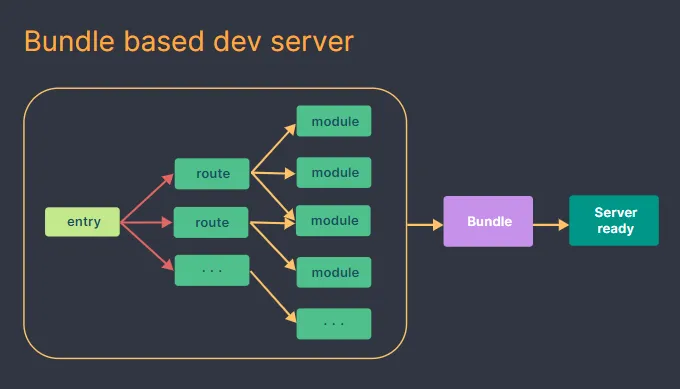
- Bundle Up? Vite or Webpack?
- ESBuild
- High-Performance Builder: Vite utilizes ESBuild, a Go-based bundler, for production builds. ESBuild is renowned for its incredible speed and efficiency.
- Optimized Output: It produces highly optimized bundles, resulting in faster load times for your application.
- Getting started with Vite
- Dependency Pre-Bundling
- Optimized Import Paths: Vite pre-bundles large dependency libraries into chunks to reduce the number of requests and improve load performance.
- Faster Development: This optimization helps in faster development by avoiding unnecessary re-bundling during development.
- Dependency Pre-Bundling
- Hot Module Replacement (HMR)
- Instant Updates: Vite implements HMR to enable rapid development by updating only the changed modules in the browser without a full page reload.
- Improved Developer Experience: This significantly enhances the development workflow by providing instant feedback on code changes.
- Plugin System
- Extensibility: Vite offers a flexible plugin system that allows developers to customize the build process to fit their specific needs.
- Rich Ecosystem: There’s a vast ecosystem of Vite plugins available for various tasks like TypeScript support, CSS preprocessors, and more.
- The Ultimate Guide to Using Vite Plugin for Lightning-Fast Web Development
How It Works
- Development Server: Vite starts a development server that serves your code directly as ESM modules. The browser handles module imports efficiently.
- HMR: Vite watches for changes in your code and uses WebSockets to send updates to the browser.1 Only the affected modules are reloaded, providing a fast feedback loop. Vite In The Browser Vite Core Features
- Production Build: When building for production, Vite uses ESBuild to bundle your code into optimized chunks. Dependency pre-bundling is applied to further improve performance.
“Vite isn’t just a fast bundler, it’s a development powerhouse. Native ESM support and Hot Module Replacement (HMR) dramatically accelerate your development workflow, while ESBuild and dependency pre-bundling ensure your production builds fly.”
Creating a Build Tool Using Go
- Set Up Your Go Environment:
- Install Go from the official Go website.
- Create a new Go project directory.
- Install Dependencies:
- Run the following commands to install the
minifypackage and its sub-packages for JavaScript and CSS minification:1 2 3
go get -u github.com/tdewolff/minify go get -u github.com/tdewolff/minify/js go get -u github.com/tdewolff/minify/css
- Read and Parse Files:
- Use the
osandio/ioutilpackages to read files from the filesystem.
- Transpile, Bundle, and Minify Code:
- Use the
minifypackage to minify JavaScript and CSS files. - Bundle multiple JavaScript and CSS modules into a single file.
- Serve Files:
- Use the
net/httppackage to serve files during development. - Implement a simple server that watches for file changes and reloads the browser.
- Command-Line Interface (CLI):
- Create a CLI using the
flagpackage to provide options for building, serving, and watching files.
Here is the complete code for the build tool:
1
2
3
4
5
6
7
8
9
10
11
12
13
14
15
16
17
18
19
20
21
22
23
24
25
26
27
28
29
30
31
32
33
34
35
36
37
38
39
40
41
42
43
44
45
46
47
48
49
50
51
52
53
54
55
56
57
58
59
60
61
62
63
64
65
66
67
68
69
70
71
72
73
74
75
76
77
78
79
80
81
82
83
84
85
86
87
88
 package main

import (
    "flag"
    "fmt"
    "io/ioutil"
    "net/http"
    "os"
    "path/filepath"
    "strings"

    "github.com/tdewolff/minify"
    "github.com/tdewolff/minify/css"
    "github.com/tdewolff/minify/js"
)

func main() {
    // Define CLI flags
    build := flag.Bool("build", false, "Build the project")
    serve := flag.Bool("serve", false, "Serve the project")
    flag.Parse()

    if *build {
        buildProject()
    }

    if *serve {
        serveProject()
    }
}

func buildProject() {
    // Initialize minifier
    m := minify.New()
    m.AddFunc("text/javascript", js.Minify)
    m.AddFunc("text/css", css.Minify)

    // Read and concatenate JavaScript and CSS files
    files, err := ioutil.ReadDir("./src")
    if err != nil {
        fmt.Println("Error reading source directory:", err)
        return
    }

    var bundledCode strings.Builder
    for _, file := range files {
        content, err := ioutil.ReadFile("./src/" + file.Name())
        if err != nil {
            fmt.Println("Error reading file:", err)
            return
        }

        var minifiedContent string
        if strings.HasSuffix(file.Name(), ".js") {
            minifiedContent, err = m.String("text/javascript", string(content))
        } else if strings.HasSuffix(file.Name(), ".css") {
            minifiedContent, err = m.String("text/css", string(content))
        }

        if err != nil {
            fmt.Println("Error minifying file:", err)
            return
        }

        bundledCode.WriteString(minifiedContent)
    }

    // Ensure the dist directory exists
    err = os.MkdirAll("./dist", os.ModePerm)
    if err != nil {
        fmt.Println("Error creating dist directory:", err)
        return
    }

    // Write the bundled and minified code to a file
    err = ioutil.WriteFile("./dist/bundle.js", []byte(bundledCode.String()), 0644)
    if err != nil {
        fmt.Println("Error writing bundled file:", err)
    } else {
        fmt.Println("Project built successfully.")
    }
}

func serveProject() {
    http.Handle("/", http.FileServer(http.Dir("./dist")))
    fmt.Println("Serving project at http://localhost:8080")
    http.ListenAndServe(":8080", nil)
}
Steps to Use the Build Tool
-
Build the Project:
1
go run main.go -build -
Serve the Project:
1
 go run main.go -serve
Enjoy Reading This Article?
Here are some more articles you might like to read next: